The Parking Spot
- 4.8
- Rating
- 1.00M
- Installs
- Free
- Price

 Analysis by App-foxy
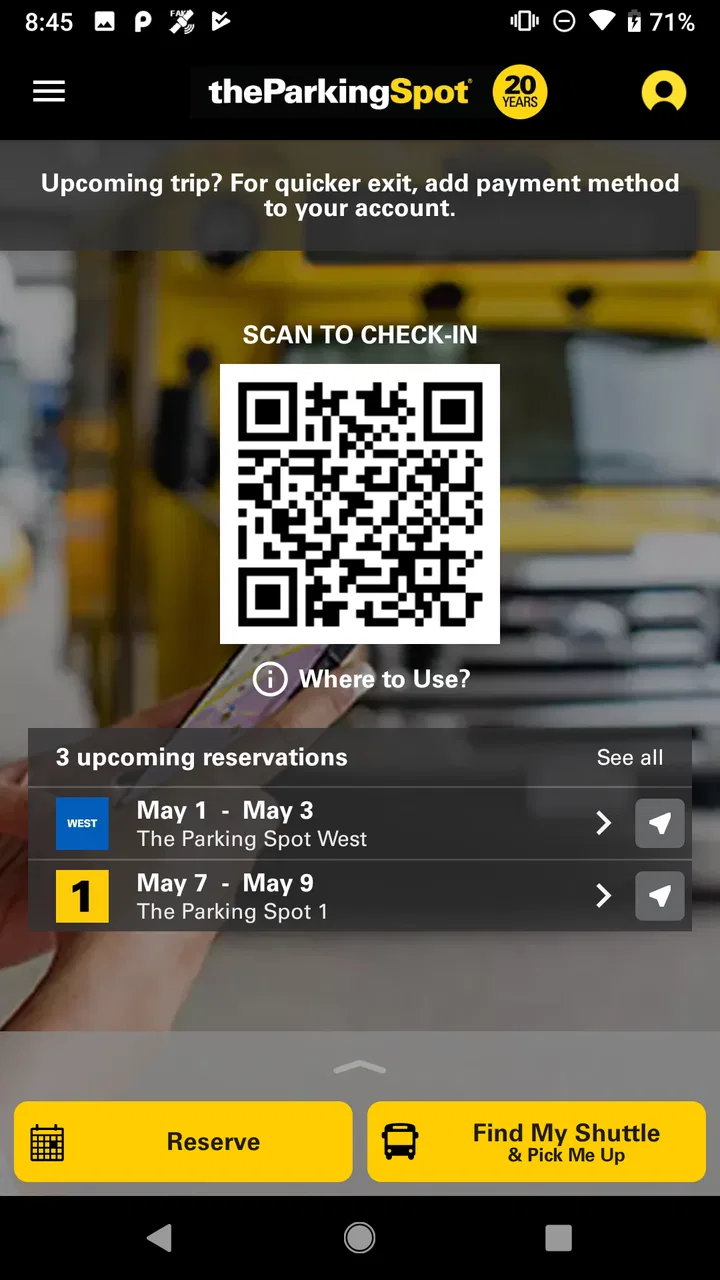
Airport parking is one of those tasks that looks simple until the travel day arrives. I want to reserve a space, find the lot without second-guessing every turn, get on the shuttle quickly, and know what to do when my flight schedule changes. The Parking Spot is built around that exact airport routine, combining parking reservations, airport shuttle information for the TPS shuttle, and the Spot Club in one mobile app. After using it as a travel companion, I found its biggest value is not flashy navigation; it is reducing the number of separate decisions I have to make before leaving my car.
This is a free Maps & Navigation app from TPS Parking Management LLC, aimed at people who use airport parking rather than relying entirely on a taxi, rideshare, public transit, or a friend’s drop-off. Its average rating is 4.7 from around 12 thousand ratings, and it has passed one million installs, so it is clearly familiar to a substantial group of travelers. It is rated for Everyone, which matches the straightforward nature of the service, and the current release is version 9.13.6 for devices running Android 6.0 or later.
How the app fits into a real airport trip
I find this app fits best when I treat airport parking as a chain of small handoffs, not just a place to leave the car: reservation to lot, lot to shuttle, and shuttle back to the car after landing. Thinking through those transitions before departure helps me spot timing gaps while I can still adjust the plan. It also makes clear why the next step is choosing the parking arrangement early.
You May Also Like

 Blood Strike: 2.5 Anniversary
Blood Strike’s Loadouts Turn Every Drop Into a Tactical Gamble
A close look at Blood Strike’s custom loadouts: how fast access to signature weapons reshapes its battle royale rhythm, rewards preparation, and narrows the gap between fights.

 Pandora - Music & Podcasts
Pandora’s Music Is Easy to Start, but Harder to Recover
Pandora’s strength is its low-effort path from a seed to a station. Its weak spot is how much confidence it asks you to place in connection, setup, and quiet recovery.

 8 Ball Pool
 Is Built on Rivalries, Rematches, and Routine
A close look at the rivalries, rematches, shared routines, and unanswered safety questions that turn a quick pool match into a persistent mobile community.

 Samsung Music
’s Quiet Strength Is Playing What You Already Own
Its reach comes less from spectacle than from dependable access to a personal library. That simplicity is both the app’s strongest retention engine and its ceiling.

 AccuWeather: Weather Radar
AccuWeather Review: A Quick, Clear Forecast for Everyday Decisions
For everyday plans, the best forecast is the one you can understand quickly. AccuWeather makes rain timing, radar, and local conditions easy to act on, with a few trade-offs.

 Hill Climb Racing
Why Hill Climb Racing Still Turns Crashes Into One More Run
A tiny car, a bumpy hill and one more upgrade: Hill Climb Racing keeps resurfacing because its simple chaos makes every near-miss feel personal.
More From Our News Desk



Planning is easier when the parking decision happens early
The most useful way to approach The Parking Spot is before the journey begins, not while circling an airport with luggage in the trunk. I use it first to think through the complete parking chain: where I will leave the vehicle, how I will reach the terminal, and how I will return to the lot after landing. That sequence matters because airport parking is rarely just a matter of finding an empty place. The shuttle connection and the return trip are part of the same decision.
Reservations are the app’s practical center. Instead of treating parking as an afterthought on departure morning, I can arrange it alongside the rest of the trip. That is especially helpful for early flights, long weekends, or any departure where arriving late would create unnecessary stress. The interface makes more sense when I already know my airport and approximate travel times; it is less useful as a general-purpose map for exploring unrelated parking areas.
I also like that the app keeps the parking service and shuttle context together. With a normal map application, I might find a parking business, switch to another screen to check directions, and then search again for information about getting to the terminal. Here, the intended workflow is narrower but more coherent. The trade-off is important: a broad navigation app remains better for comparing every nearby parking option, while this app is better once The Parking Spot is the service I am considering.
Connectivity matters before the car leaves the driveway
The experience depends on being able to communicate with the service while planning and traveling. A reservation is not merely a static map pin; it is part of an airport process that may involve selecting a location, checking the shuttle arrangement, and referring back to trip details. I therefore prefer to open the app at home, while the connection is stable, rather than waiting until I am already in an unfamiliar airport access road.
This is one of the less obvious habits that makes the app feel more reliable: I review the reservation before departure and make sure I understand the lot and terminal plan before starting the drive. That does not eliminate every travel problem, but it moves the information-gathering step away from the most stressful part of the journey. A phone with a weak signal, a busy airport road, or a nearly empty battery is a poor time to begin figuring out how the parking service works.
I would not treat it as a replacement for every navigation tool on the phone. For the drive itself, I still prefer a dedicated navigation app when I need live traffic, lane guidance, or a broad route comparison. The Parking Spot serves a different role: it helps organize the parking stop and the shuttle connection. Keeping those roles separate is sensible, but it means I usually use more than one app during the trip.
The mobile experience is designed for rushed moments
Airport tasks are often performed one-handed, in a hurry, and with attention split between signs, luggage, and other passengers. The Parking Spot works best when I use it for short, purposeful checks rather than extended browsing. Before leaving, I can focus on the reservation. Near the airport, I want the relevant parking information without having to reconstruct the whole trip from memory.
That mobile focus is valuable for travelers who drive themselves to the airport regularly. A frequent flyer can build a repeatable routine: reserve the space, check the shuttle plan, save enough time for the transfer, and use the same app again on the return. The Spot Club also gives the experience a loyalty-oriented layer for people who use the service repeatedly. Occasional travelers may not care about that part, but regular airport parkers have a reason to keep the app installed beyond one booking.
There is a practical limitation to using any airport app while driving: I should not be tapping through screens at the lot entrance or on terminal roads. The app can support the trip, but it cannot make distracted phone use safe. I get better results by preparing the important details before moving and asking a passenger to handle the phone when something needs checking en route.
A realistic departure-day workflow
Imagine a morning flight that requires leaving home before sunrise. I open the app the previous evening, arrange the parking reservation, and look over the shuttle plan. On departure morning, I use my regular navigation tool for the drive and keep The Parking Spot available for the parking-specific details. Once I arrive, the important question is no longer “where is the airport?” but “am I at the correct parking location, and how do I get from the car to the terminal?”
That distinction is where the app earns its place. It reduces the mental gap between parking and flying. I still need to allow time for parking, gathering luggage, and taking the shuttle, but the app helps me make those steps part of one plan instead of treating the terminal arrival as the only event that matters.
On the way home, the workflow changes. I am tired, possibly carrying more luggage, and less interested in exploring menus. The useful preparation is remembering that the parking lot is the destination after the airport ride, not simply the place where the outbound trip began. Having the parking service already associated with the trip can be more helpful than searching from scratch after landing.
When the connection is weak or something goes wrong
The most important limitation is also the easiest to overlook: a connected app is only as convenient as the phone connection and battery available at the moment. I do not rely on a last-minute screen load for essential travel information. Before driving, I check the reservation and shuttle-related details while online, then keep my phone charged enough to handle the return journey. I also make a mental note of the airport and parking location instead of assuming I will always be able to search again instantly.
This is not a criticism unique to The Parking Spot, but the airport setting makes it more noticeable. At home, a delayed page is an annoyance. At a busy lot, it can become a source of confusion when several roads, entrances, and shuttle stops look similar. My recovery habit is simple: stop safely, reconnect if possible, and use the reservation information I reviewed earlier. If I am traveling with someone, I let that person handle the phone while I concentrate on signs and vehicle movement.
I also recommend leaving a margin between the planned parking arrival and the flight. The app can organize the parking and shuttle steps, but it cannot control road congestion, luggage delays, or the time required to board a shuttle. Anyone who expects the reservation itself to guarantee a fast terminal arrival may be disappointed. The service is a tool for planning, not a promise that every airport transfer will take the same amount of time.
For recovery after a changed flight, the app is most useful when I return to the reservation rather than starting a completely new search. I would check the relevant trip details and follow the available service instructions, while remembering that airline changes and parking arrangements are separate parts of the journey. That separation is another reason not to assume one app can answer every travel question.
Using it without wasting mobile data
The app is not something I need to keep open continuously. My data-conscious approach is to use it at deliberate checkpoints: while making the reservation, before leaving home, and when I need parking-specific information at the airport or after landing. Constantly reopening screens while driving adds little value and can consume attention as well as battery.
Preparing at home has two advantages. First, the connection is usually more dependable than it is in a crowded airport environment. Second, I have time to notice whether I selected the intended parking location and travel dates. A quick review on a stable connection is more useful than repeated attempts to load details beside the terminal.
I still use a separate navigation app for the road when live routing is important. That division can be more data-efficient than asking one service to do everything: The Parking Spot handles the parking relationship, while the navigation tool handles the drive. It also makes troubleshooting easier. If the route changes, I know where to look; if I need parking or shuttle information, I return to this app.
Travelers with limited mobile data should be particularly disciplined about preparation. I would avoid unnecessary browsing and focus on the screens needed for the reservation and airport transfer. The app’s value comes from timely information, not from leaving it running in the background throughout the entire trip.
Who gets the most from the Spot Club
The Spot Club is more relevant to repeat users than to someone parking at an airport once in a year. Frequent flyers often benefit from building a familiar routine, and a loyalty feature gives that routine a reason to stay inside the same service. I see it as an extra layer rather than the main reason to choose the app. The core decision should still be whether the parking location, reservation process, and shuttle arrangement fit the trip.
For a regular airport parker, the combination is appealing: one place to manage parking reservations, refer to shuttle information, and engage with the service’s club program. For an occasional traveler, the club may add little if the person is mainly comparing total convenience and wants the simplest possible one-time arrangement. In that case, the free app is still useful, but the loyalty side should not drive the decision.
Where it is stronger than ordinary alternatives
Compared with a general map, The Parking Spot has a narrower purpose and a more travel-specific workflow. A map is excellent for finding businesses, comparing routes, and checking traffic, but it may leave the user to assemble parking reservations and airport shuttle details separately. This app is stronger when the parking provider is already part of the plan.
Compared with relying on airport signs, it gives me a planning step before I arrive. Signs can guide a driver once inside the airport area, but they do not replace the decision about where to park or how much transfer time to allow. Compared with using a rideshare for the entire trip, airport parking keeps the traveler’s own car available and may suit longer journeys or households carrying bulky luggage. The app does not make that choice universally better; it simply supports the parking-and-shuttle version of the trip.
Its narrow focus is also its main weakness. If I am deciding between public transportation, terminal garages, street parking, rideshare, and several independent lots, I want a broader comparison tool. The Parking Spot is not the right first stop for that open-ended search. I would choose it when I have already decided that this parking service is a realistic option and want a smoother way to organize it.
Small habits that make the experience better
I found three habits especially useful. First, I make the reservation while I still have time to compare the airport plan with my flight schedule, rather than doing it during the final packing rush. Second, I check the parking and shuttle details before entering the airport road system, because that is when a small uncertainty becomes expensive in time. Third, I treat the return journey as a separate planning problem and make sure I know that I will need to reconnect with the parking service after landing.
A fourth habit is to keep a simple backup in my own memory: the airport, the parking location, and the fact that the shuttle is part of the transfer. I am not trying to replace the app; I am avoiding total dependence on a single screen at a busy moment. This is particularly sensible for early departures, long drives, or trips where the phone will also be used for boarding information and communication.
Finally, I would not judge the app only by how quickly it opens at home. The real test is whether it supports the transitions that cause airport stress: leaving the car, reaching the terminal, and finding the car again. That is where the focused design matters more than having a long list of unrelated travel features.
My connectivity verdict
The Parking Spot is most convincing when used as a prepared airport-parking companion, not as an all-purpose navigation replacement. Its connected nature supports reservations, parking-specific planning, shuttle awareness, and the Spot Club in one focused experience. The free price and Everyone rating make it easy to try, while the strong average rating and broad install base suggest that many travelers find the approach useful.
I recommend it to drivers who regularly park at airports, families who want the parking and shuttle steps organized before departure, and travelers who prefer using their own car rather than arranging a ride to and from the terminal. I would be more cautious about recommending it to someone who wants to compare every transportation option, needs a full live-navigation solution, or dislikes preparing trip details in advance.
My final advice is to use the app while connected and calm, then rely on it selectively during the journey. Confirm the reservation before leaving, understand the shuttle part of the transfer, keep the phone charged, and use a dedicated navigation tool when the road itself needs live guidance. Used that way, The Parking Spot does something genuinely helpful: it turns airport parking from an improvised stop into a planned part of the trip.
FAQs for The Parking Spot
01What features does The Parking Spot app offer to users?
The Parking Spot app provides users with features such as real-time availability of parking spots, reservation options, and GPS navigation to the selected spot. It also offers seamless payment options, loyalty rewards, and personalized recommendations based on your past parking habits, making your parking experience as smooth as possible.
02How does The Parking Spot app ensure the security of my vehicle?
The Parking Spot app partners with facilities that offer enhanced security measures, including surveillance cameras, gated entry, and on-site personnel. Users can also receive real-time updates and notifications about their vehicle’s status, providing peace of mind while you’re away. Always check for specific security features listed for each location.
03Is The Parking Spot app available in all cities?
The Parking Spot app primarily operates in major metropolitan areas and near airports. However, availability can vary, so it's best to check the app or website for current locations. The company is continually expanding its reach to offer more parking options in new cities, ensuring convenience wherever you travel.
04What payment methods are supported by The Parking Spot app?
The Parking Spot app supports various payment methods, including credit and debit cards, mobile payments like Apple Pay and Google Pay, and in-app wallet options. This flexibility allows users to choose the most convenient payment method, ensuring a hassle-free transaction experience every time you park.
05Can I cancel or modify my reservation on The Parking Spot app?
Yes, The Parking Spot app allows users to cancel or modify reservations directly within the app. Policies regarding cancellations or changes may vary depending on the location, so it’s important to check the terms and conditions for your specific reservation. Be sure to handle any changes in advance to avoid potential fees.
Pros
- Easy-to-use interface for quick booking.
- Real-time shuttle tracking enhances convenience.
- Multiple payment options available.
- Loyalty rewards for frequent users.
- 24/7 customer support for assistance.
Cons
- Limited locations in some areas.
- Occasional app crashes reported.
- Booking modifications can be cumbersome.
- Shuttle wait times can vary.
- No offline mode for reservation access.

The Parking Spot
Gallery